Keyword Gap Analysis
Use Keyword Gap Analysis when you need to compare one tracked app against competitor apps in the same market. The page helps you find keywords where competitors rank, where your app ranks, and whether those keywords are already covered in app metadata.
When To Use It
Use Keyword Gap Analysis to:
- Compare a tracked app against selected competitor apps.
- Find keywords where competitors have stronger ranking coverage.
- Identify terms that are missing from your own metadata.
- Prioritize keyword gaps using volume, trend, rank, and phrase-length signals.
- Export a reviewed comparison set for ASO planning.
Before You Start
Prepare the comparison context:
- Mode: use Tracked App when the app and competitors are already saved in AppVector; use Manual when you need to build a comparison directly.
- Tracked App: the app you want to evaluate.
- Country: the store market for the comparison.
- Language: the language for keyword and metadata signals.
- Competitors: the competitor set included in the comparison.
- Date range: the ranking period for the table, such as Last 90 days.
Keyword Gap Analysis is only useful when the app, market, language, and competitor set match the decision you are trying to make. Avoid mixing markets or unrelated competitor sets in one review.
Run The Comparison
- Open Keyword Gap Analysis from the Keywords area in the left navigation.
- Choose Tracked App or Manual.
- Select the tracked app.
- Confirm country, language, competitors, and date range.
- Review the generated keyword count.
- Use the search box and filters to narrow the result set before exporting or changing metadata plans.
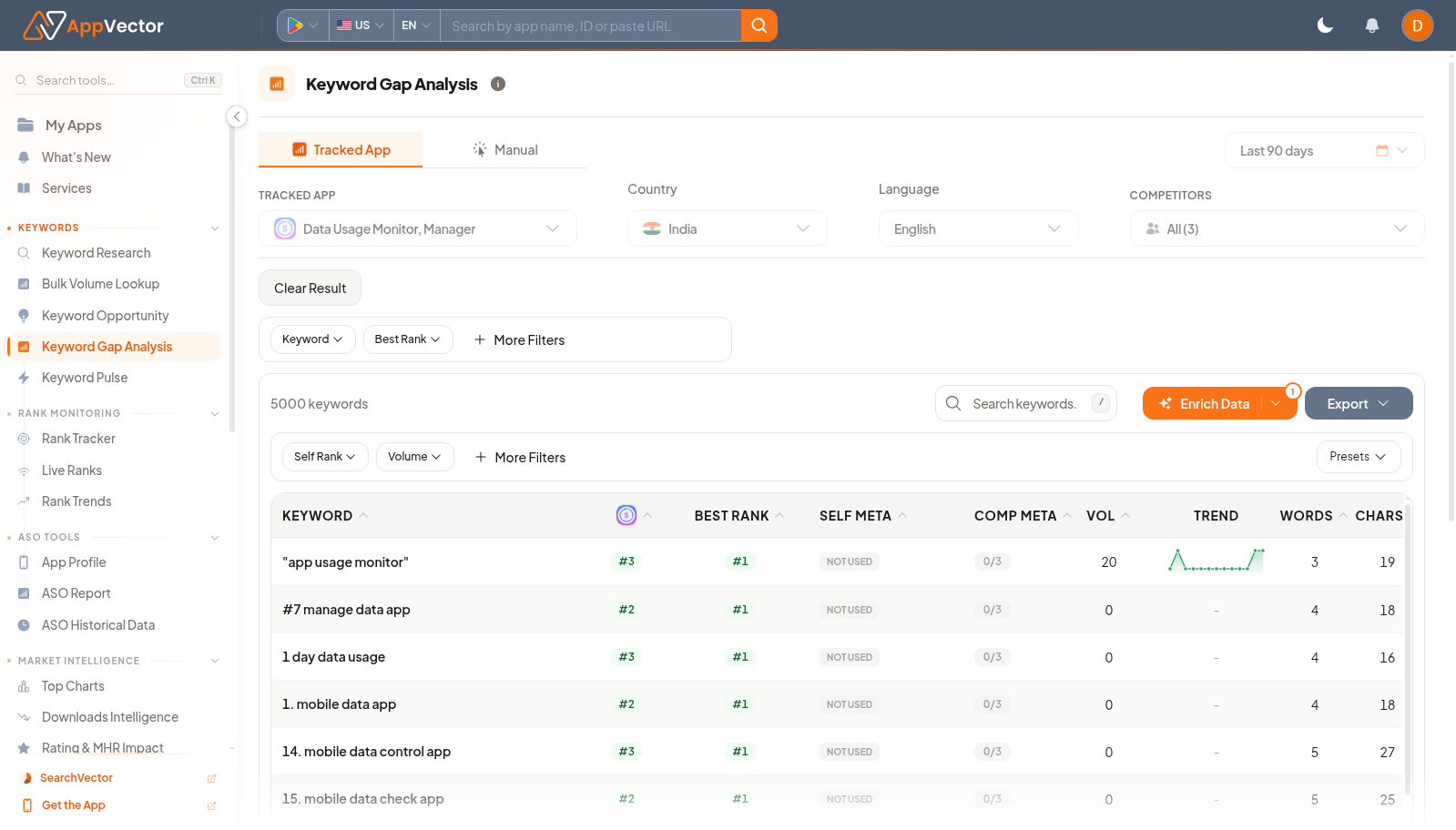
Read The Results
The table shows how the tracked app compares with the competitor set:
- Keyword: the search term being compared.
- Self Rank: the selected app's observed rank for that keyword.
- Best Rank: the best rank observed across the compared apps.
- Self Meta: whether the tracked app uses the term in metadata.
- Comp Meta: how many competitors use the term in metadata.
- Vol: estimated search volume for the selected market.
- Trend: recent movement or demand pattern.
- Words: number of words in the phrase.
- Chars: character count for metadata planning.
Prioritize rows where competitors rank well or use the keyword in metadata while the tracked app does not. Then validate the keyword's relevance before adding it to a metadata plan.
Filter The Comparison
Use the table controls to move from a large comparison set to a workable shortlist:
- Search keywords... to focus on a phrase, feature, or category.
- Keyword to filter by keyword text.
- Best Rank to find terms where at least one compared app ranks strongly.
- Self Rank to focus on where the tracked app is weak or absent.
- Volume to avoid spending time on terms without enough demand.
- More Filters for additional scoring and metadata filters.
- Presets when your team has saved a repeatable review setup.
Use Enrich Data when you need to refresh keyword metrics for the current comparison before exporting a final shortlist.
Use pagination and rows-per-page controls when the table contains thousands of results. Do not treat the first page as the full opportunity set unless your filters already narrow the table.
Decide What To Do Next
After filtering:
- Mark keywords where Self Meta is Not Used but competitor coverage is meaningful.
- Check whether the tracked app already ranks close enough to improve with metadata changes.
- Separate high-volume category terms from specific long-tail opportunities.
- Send validated keywords into metadata planning, Keyword Pulse, or Rank Tracker.
- Export only the reviewed rows that match the current market and competitor context.
If the result set is too broad, reduce it with country, language, competitor, rank, or volume filters before making ASO decisions.