Keyword Opportunity
Use Keyword Opportunity when you want to turn existing app store ranking signals into a practical keyword shortlist. The page shows keywords for a selected app, country, and language, then combines rank, metadata usage, demand, and trend signals so you can decide which terms deserve ASO work.
When To Use It
Use Keyword Opportunity to:
- Find keywords where the app already has a visible rank.
- Spot terms that rank but are not yet used in app metadata.
- Compare ranking position against metadata usage, volume, trend, CPC, and phrase length.
- Build a shortlist for metadata updates, Rank Tracker, or ASO Report follow-up work.
- Export a reviewed keyword set for planning or reporting.
Before You Start
Choose the market and app context before reading the table:
- Country: the store market you want to evaluate.
- Language: the language for keyword and metadata signals.
- App: the app whose opportunities you want to review.
- Date range: the ranking period used for the opportunity table.
The table is most useful when you review one market at a time. Keyword volume, trends, and ranking difficulty can change significantly between countries.
Review Keyword Opportunities
- Open Keyword Opportunity from the Keywords area in the left navigation.
- Confirm the selected country and language.
- Select the app you want to evaluate.
- Choose a date range such as Last 28 days.
- Use Search table... when you already know the keyword or phrase family you want to inspect.
- Review the opportunity table before exporting or changing metadata.
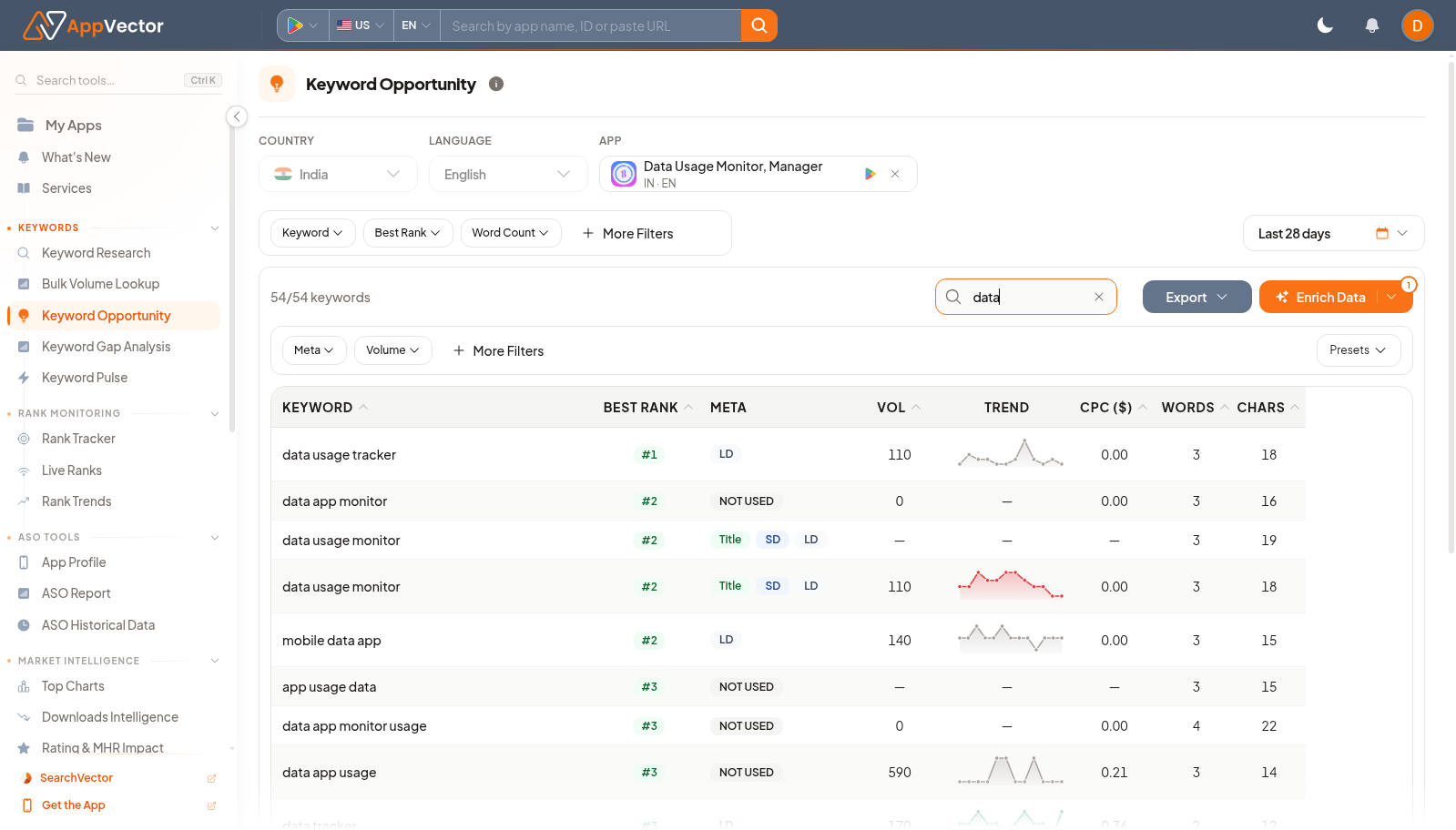
Read The Results
The table combines ranking and keyword-quality signals:
- Keyword: the app store search term.
- Best Rank: the best observed ranking position for the selected app and period.
- Meta: whether the keyword appears in app metadata. Chips such as Title, SD, and LD indicate where the term is used; Not Used flags a possible metadata gap.
- Vol: estimated search volume for the selected market.
- Trend: recent movement or demand pattern.
- CPC: paid-search cost signal where available.
- Words: number of words in the phrase.
- Chars: character count, useful when planning title, subtitle, short description, or description copy.
Start with keywords that combine relevance, meaningful volume, a realistic rank, and a metadata gap. A term marked Not Used is not automatically a good target; it still needs to match the app's positioning and user intent.
Filter The Table
Use the filter row to narrow the table:
- Keyword: focus on a term, phrase, or category.
- Best Rank: isolate keywords where the app is already close to a target rank range.
- Word Count: narrow to short or long-tail phrases.
- Meta: isolate terms that are used or not used in metadata.
- More Filters: refine by additional keyword metrics such as volume, CPC, word count, or character count.
- Presets: reuse saved filter combinations when your team has them configured.
Use Enrich Data when you need to refresh or fill missing keyword metrics for the current list. Use Export only after you have filtered or reviewed the list. Export options are useful for planning in Sheets or sharing a shortlist, but the exported set should reflect the market, date range, and app context currently selected on the page.
Decide What To Do Next
After reviewing the table:
- Shortlist relevant Not Used keywords with enough volume or clear strategic value.
- Check whether top-ranked keywords should be tracked in Keyword Pulse or Rank Tracker.
- Use metadata chips to identify where a term is already covered before proposing copy changes.
- Compare broad terms with long-tail phrases before making title or description edits.
- Export the reviewed shortlist for ASO planning or reporting.
If the page shows very few useful terms, switch markets, adjust the date range, or go back to Keyword Research to discover new seed terms before using Keyword Opportunity again.